
Cocobi Little Police - Kids
KIGLEEducational
3.819.00 Reviews
- Version
- 1.0.22
- Installs
- 10.00M
- Age Rating
- Everyone
Screenshots
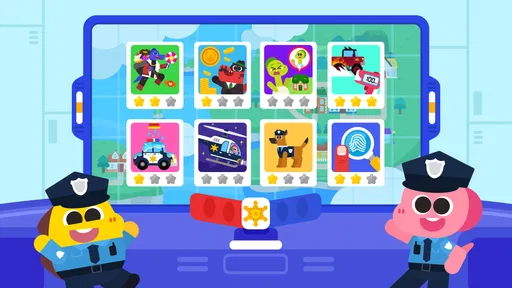

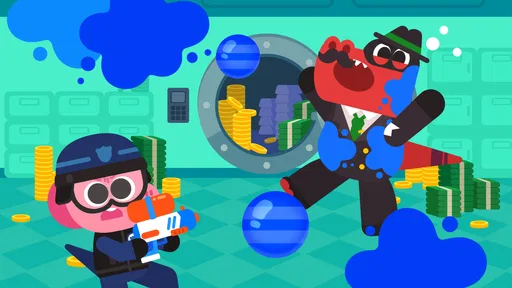

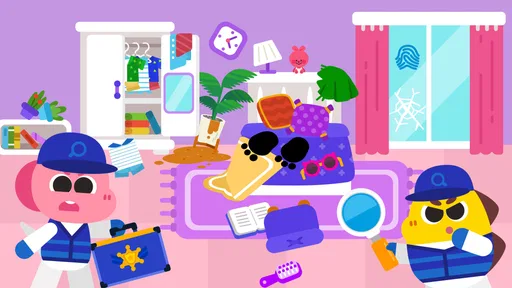
Our Review of Cocobi Little Police - Kids
 Analysis by Appyee
I spent time with Cocobi Little Police as a light, child-friendly game rather than treating it like a formal learning course. Its appeal is easy to understand: children join dinosaur characters in police-themed activities, follow simple situations, and learn through doing instead of reading long explanations. That makes it a natural fit for a short play session when a child wants something more purposeful than a completely passive cartoon.
The game is made by KIGLE and sits in the educational game category. It is free to download, rated for Everyone, and has reached over ten million installs. Those figures suggest that it is aimed at a broad family audience, not at older children looking for a demanding simulation. My overall impression is that it works best as a gentle introduction to interactive problem-solving, especially for preschool and early elementary players who enjoy characters, repetition, and clear visual direction.
There is one important expectation to set before installing it. This is not a realistic police simulator, and it should not be judged by the standards of a complex strategy game. The police theme is a friendly wrapper for simple activities. If you want a child to practise advanced reading, mathematics, or independent planning, another educational app will probably go further. If you want a young child to practise attention, recognition, and following a sequence while having fun, this is much closer to the right choice.
How the everyday play loop works
I use the everyday play loop as a chance to notice how a child approaches a scene, not just whether they finish it. Watching for the pause before a tap can show when the visual cues are making sense and when a little guidance would help. From there, the next section looks at how an adult can keep that support light without turning play into a lesson.
A simple starting point for young players
The most useful way to introduce the game is to let the child explore one activity at a time rather than handing over the device and expecting independent mastery immediately. The dinosaur police setting gives the child an obvious role, while the visual presentation keeps the first steps approachable. I found that a short demonstration from an adult can make a big difference: show how to identify the next object or action, then let the child repeat it without taking control away.
This matters because young players often understand the goal before they understand the controls. They may know that the police characters need help but still tap randomly when the screen changes. Instead of correcting every mistake, I would encourage the child to pause and look at the whole scene first. That small habit turns the game from rapid tapping into a basic exercise in observation.
A practical routine is to begin with a few minutes of guided play, continue with a quiet independent attempt, and then ask the child to explain what happened. The explanation is valuable even when it is incomplete. It encourages the player to connect an action with a result, which is more educational than simply finishing as quickly as possible.
Why repetition is useful here
The activities are most suitable for children who benefit from repeating familiar patterns. A child may need several attempts to notice the right visual clue, remember the order of actions, or understand why a tap did not produce the expected result. That repetition does not feel like a worksheet, and the dinosaur characters help keep the mood relaxed.
I would not rush a child through a task simply because the adult already understands it. Replaying a familiar section can reinforce visual memory and confidence. A good approach is to change the challenge slightly through conversation: ask what the child noticed first, what they would try next, or which character needs help. The game supplies the setting, while the adult adds the deeper learning.
This is also where the game differs from a conventional educational video. A video can explain a safety or community idea, but it does not require the child to respond. Here, the child has to notice something and make a choice. The learning remains informal, yet the interaction gives it more value than watching the same scene passively.
Using it in a realistic family moment
Imagine a child waiting while dinner is being prepared or settling down after a busy day. A short session can fill that gap without demanding a long story or complicated instructions. I would set a clear stopping point before play begins, such as finishing one activity or playing for a brief period, because young children can find it difficult to stop when the game is enjoyable.
For a younger child, sitting nearby for the first session is worthwhile. You can help with reading any visible prompts, but avoid solving every problem. For a child who already handles basic touch controls, the better role is to watch quietly and step in only when frustration starts. That balance lets the game function as an independent activity without turning it into unsupervised screen time.
The same routine can work during travel or a waiting-room visit, although I would check the device beforehand and avoid assuming that every child will remain engaged for a long period. This is a game for small, repeatable moments, not necessarily a complete afternoon activity.
Settings and device habits worth checking
Before giving the device to a child, I recommend checking the phone or tablet’s general controls rather than expecting the game itself to manage the whole experience. Turn down the volume if the surroundings are quiet, use a comfortable brightness level, and make sure the device will not be interrupted by unrelated notifications. These simple preparations reduce the chance that a child will leave the activity or tap something confusing.
Because the game is free and includes in-app purchases priced at $1.99 per item, I would also review the device’s purchase protections before handing it over. The sensible family workflow is to keep purchase approval under the adult’s control and avoid letting a child explore payment screens independently. This is less about the game’s theme and more about creating a predictable, safe setup for any free children’s app with optional paid items.
I would also check the age profile of the child against the Everyone content rating. That rating makes the game broadly accessible, but it does not mean every child will find the same controls equally easy. A toddler may still need help with touch accuracy, while an older child may quickly outgrow the simplicity. The rating is a useful starting point, not a guarantee of perfect developmental fit.
Another worthwhile habit is to keep the device in a stable position. Young children often tap with a whole hand or move the tablet while playing, which can make an otherwise simple interaction seem unreliable. A stand or a firm surface can improve control and reduce accidental touches. This is a small adjustment, but it often makes the first session less frustrating.
Shortcuts in the form of repeatable habits
I would not describe this game as having expert shortcuts in the usual gaming sense. Its faster patterns come from how the player approaches each scene. Looking before tapping, identifying the characters involved, and completing one apparent objective at a time are more useful than trying to move quickly. Children who develop that rhythm tend to make fewer random choices.
One particularly helpful habit is to ask the child to point at the intended target before touching it. This adds a moment of planning without making the game feel like a lesson. If the child points correctly but taps inaccurately, the issue is motor control. If the child points to the wrong object, the issue is recognition or attention. That distinction helps an adult offer the right kind of support instead of simply saying, “Try again.”
Another efficient pattern is to use the same language each time: “What do we need first?” and “What changed after you tapped?” Repeated questions create a small framework for thinking through the activities. Over time, the child may begin asking those questions internally, which is a more meaningful gain than merely completing a familiar scene.
For siblings, I would avoid turning the game into a speed contest. A younger player may need more time, and the educational value is easily lost when an older child grabs the device or calls out every answer. Taking turns as the “helper” can work better: one child plays while the other describes what to look for, then they switch. The adult should still supervise so the helper does not become a second source of pressure.
What experienced use can and cannot improve
With regular short sessions, a child may become more comfortable with the game’s visual language and basic interaction style. That familiarity can make play smoother, but it should not be mistaken for broad academic progress. The game can support attention and simple decision-making in context; it is not a substitute for books, conversation, hands-on play, or structured early-learning material.
This distinction is important when comparing it with other educational games. Some alternatives focus tightly on letters, counting, spelling, or puzzles with clearly measurable progression. Cocobi Little Police is more character-led and situational. I would choose it when motivation and friendly role-play are the priority. I would choose a focused literacy or numeracy app when a child has a specific skill to practise and needs a more systematic sequence.
It also differs from open-ended digital play. A sandbox-style game may offer more freedom, but it can leave a young child unsure what to do next. The police theme here provides a clearer frame. On the other hand, children who already enjoy designing their own stories may find the guided structure restrictive after the novelty fades.
Limits that parents should understand
The biggest limitation is depth. The game’s approachable design is also what keeps it from satisfying older or more advanced players. Once a child understands the recurring interaction style, the challenge may feel familiar rather than progressively demanding. That is not a flaw for its intended use, but it does mean that parents should view it as one option in a wider collection of activities.
The free model also deserves practical attention. Optional purchases of $1.99 per item can be reasonable for families that want extra content, but I would not present them as necessary for the basic experience. Decide in advance whether the child may access any paid additions. Clear rules prevent the common situation in which a child interprets a visible purchase option as part of the game’s normal goal.
The average rating is 3.8 from around 2.6 thousand ratings, with 19 written reviews shown alongside it. I would read that as a sign to keep expectations balanced: many families have tried it, but popularity alone does not make it ideal for every child. The current version is 1.0.22, and the game requires Android 7.0 or later, so checking the device before planning a session is sensible.
That Android requirement is especially relevant for families using an older hand-me-down phone or tablet. A child may be perfectly suited to the game while the device is not. I would confirm compatibility first, then test the controls myself before presenting it as a special activity. A few minutes of preparation can prevent disappointment.
Who should choose it, and who should skip it?
I think it is a good match for young children who enjoy dinosaurs, community-helper themes, and clear guided tasks. It is also useful for adults who want an easy conversation starter about helping others, noticing details, and following steps. The game’s friendly presentation makes it less intimidating than an app that looks like a digital workbook.
I would be more cautious about recommending it to children who need a strong academic curriculum, extensive reading practice, or challenging logic problems. It is also not the best choice for a child who becomes frustrated by repeated attempts or prefers complete freedom over guided play. In those cases, a focused learning app or a creative construction game may hold attention better.
Families should also skip it if they are looking for a completely hands-off solution. Even when the child can play independently, the most useful results come from occasional discussion and sensible device boundaries. The app can support a routine, but it cannot replace an adult’s judgement about session length, content fit, or purchase controls.
My final assessment after using it
The best way to use Cocobi Little Police is as a short, guided play activity that turns simple interaction into conversation. I like its approachable dinosaur police setting, its low barrier to entry, and the way it gives young children a reason to observe and respond. It feels more purposeful than a purely passive cartoon while remaining much less demanding than a structured school-style course.
Its weaknesses are equally clear. The learning is broad rather than specialised, the challenge may not last for older children, and the free model requires adults to handle optional purchases responsibly. Those points do not disqualify it; they simply define the right place for it in a child’s routine.
KIGLE has made a game that is easiest to recommend when expectations are realistic. I would install it for a child who needs a friendly first step into educational play, especially for short sessions at home or while waiting. I would not rely on it as the only learning app, and I would move to a more focused alternative when the child asks for harder puzzles or needs deliberate reading and number practice.
Overall, I see it as a pleasant supporting activity rather than a complete learning system. Used with a stable device setup, clear screen-time boundaries, and a few thoughtful questions from an adult, it can make ordinary waiting time more engaging and give a young player small opportunities to practise attention and choice. That is a modest goal, but for the right child, it is a useful one.
Verdict
Strengths of Cocobi Little Police - Kids
- Simple controls make it accessible for young children.
- Bright visuals and friendly characters keep kids engaged.
- Short activities suit brief play sessions.
- Encourages basic problem-solving through police-themed tasks.
- Child-friendly gameplay avoids frightening or aggressive content.
Limitations of Cocobi Little Police - Kids
- Some activities may feel repetitive after extended play.
- The app can take considerable storage space on some devices.
- Certain content or features may require in-app purchases.
- Limited challenge may not appeal to older children.
- Performance can vary on older or less powerful devices.
Other Releases by KIGLE
View All
Cocobi Life World - city, town
Educational3.9

Cocobi Baby Care - Babysitter
Educational3.8

Cocobi Hospital - Kids Doctor
Educational3.8

Cocobi Good Habits -Kid Toilet
Educational3.3
Similar Picks in This Category
View All
Little Panda Policeman
BabyBus4.0

Monster Trucks Game for Kids 2
Raz Games4.1

Little Panda's Chinese Recipes
BabyBus4.4

Little Panda's Restaurant
BabyBus4.4

Little Panda's Ice Cream Games
BabyBus4.3

Baby Panda Care
BabyBus3.8
Frequently Asked Questions
What is Cocobi Little Police - Kids about?
Cocobi Little Police - Kids is an interactive role-playing game designed for young children. Players become little police officers and respond to different situations, such as helping people, finding lost items, solving simple problems, and keeping the community safe. The activities are presented through colorful graphics, short tasks, and easy controls suitable for preschool and early elementary-age children.
Is Cocobi Little Police - Kids suitable for young children?
The game is aimed primarily at children, especially preschoolers and younger elementary-school users. Its simple tap-based controls, friendly characters, bright visuals, and straightforward missions make it easy to understand without advanced reading skills. Parents should still review the recommended age rating on the relevant app store, since children develop at different rates and may need occasional guidance while playing.
Does the game require an internet connection?
Cocobi Little Police - Kids may allow children to play many activities without a continuous internet connection, which is convenient for travel or use away from home. However, an internet connection can be required for downloading the app, receiving updates, displaying certain advertisements, or accessing optional content. Availability may vary by device version and region, so checking the store listing is recommended.
Are there advertisements or in-app purchases in Cocobi Little Police - Kids?
Parents should check the current Google Play or App Store listing for the exact advertising and purchase policy, because these details can change with updates. Some versions of children’s games may include advertisements, optional purchases, or paid features. To prevent accidental spending, parents should use device-level purchase restrictions and supervise the child’s access to the phone or tablet.
What can children learn or practice while playing Cocobi Little Police - Kids?
The game is mainly designed for entertaining pretend play, but its missions can also encourage observation, basic problem-solving, following instructions, and understanding helpful community behavior. Children may practice choosing actions, recognizing simple situations, and completing tasks in sequence. It should not be considered formal educational or police-safety training, and adult discussion is useful for explaining real-world safety rules.
Play our best games!


